morphic-ai-answer-engine-generative-ui
Morphic
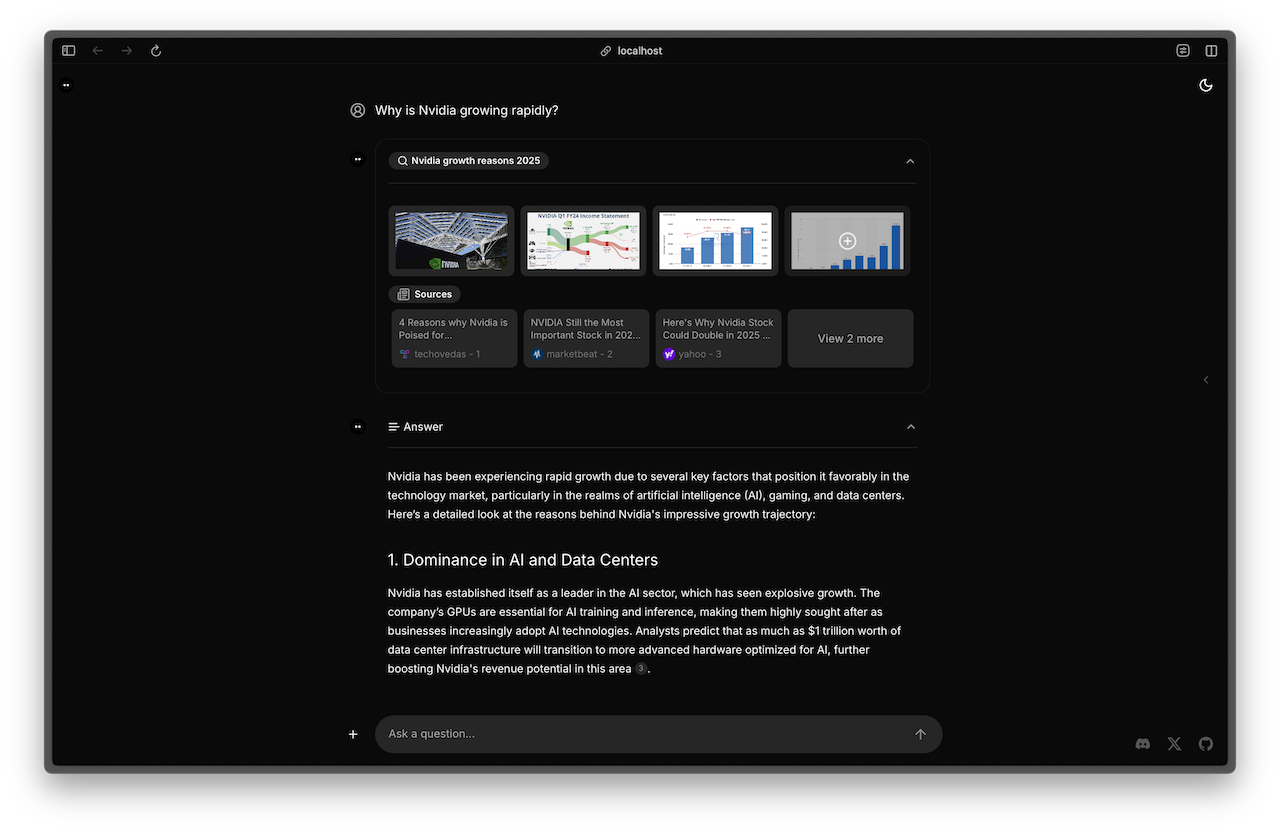
An AI-powered search engine with a generative UI.
🗂️ Overview
- 🛠 Features
- 🧱 Stack
- 🚀 Quickstart
- 🌐 Deploy
- 🔎 Search Engine
- ✅ Verified models
- ⚡ AI SDK Implementation
- 📦 Open Source vs Cloud Offering
- 👥 Contributing
🛠 Features
Core Features
- AI-powered search with GenerativeUI
- Natural language question understanding
- Multiple search providers support (Tavily, SearXNG, Exa)
- Model selection from UI (switch between available AI models)
Chat & History
- Chat history functionality (Optional)
- Share search results (Optional)
- Redis support (Local/Upstash)
AI Providers
- OpenAI (Default)
- Google Generative AI
- Azure OpenAI
- Anthropic
- Ollama
- Groq
- OpenAI Compatible
Search Capabilities
- URL-specific search
- Video search support (Optional)
- SearXNG integration with:
- Customizable search depth (basic/advanced)
- Configurable engines
- Adjustable results limit
- Safe search options
- Custom time range filtering
Additional Features
- Docker deployment ready
- Browser search engine integration
🧱 Stack
Core Framework
- Next.js - App Router, React Server Components
- TypeScript - Type safety
- Vercel AI SDK - Text streaming / Generative UI
AI & Search
- OpenAI - Default AI provider (Optional: Google AI, Anthropic, Groq, Ollama, Azure OpenAI)
- Tavily AI - Default search provider
- Alternative providers:
Data Storage
UI & Styling
- Tailwind CSS - Utility-first CSS framework
- shadcn/ui - Re-usable components
- Radix UI - Unstyled, accessible components
- Lucide Icons - Beautiful & consistent icons
🚀 Quickstart
1. Fork and Clone repo
Fork the repo to your Github account, then run the following command to clone the repo:
git clone git@github.com:[YOUR_GITHUB_ACCOUNT]/morphic.git
2. Install dependencies
cd morphic
bun install
3. Configure environment variables
cp .env.local.example .env.local
Fill in the required environment variables in .env.local:
# Required
OPENAI_API_KEY=     # Get from https://platform.openai.com/api-keys
TAVILY_API_KEY=     # Get from https://app.tavily.com/home
For optional features configuration (Redis, SearXNG, etc.), see CONFIGURATION.md
4. Run app locally
Using Bun
bun dev
Using Docker
docker compose up -d
Visit http://localhost:3000 in your browser.
🌐 Deploy
Host your own live version of Morphic with Vercel or Cloudflare Pages.
Vercel
🔎 Search Engine
Setting up the Search Engine in Your Browser
If you want to use Morphic as a search engine in your browser, follow these steps:
- Open your browser settings.
- Navigate to the search engine settings section.
- Select “Manage search engines and site search”.
- Under “Site search”, click on “Add”.
- Fill in the fields as follows:
- Search engine: Morphic
- Shortcut: morphic
- URL with %s in place of query:
https://morphic.sh/search?q=%s
- Click “Add” to save the new search engine.
- Find “Morphic” in the list of site search, click on the three dots next to it, and select “Make default”.
This will allow you to use Morphic as your default search engine in the browser.
✅ Verified models
List of models applicable to all
- OpenAI
- gpt-4o
- gpt-4o-mini
- gpt-4-turbo
- gpt-3.5-turbo
- Google
- Gemini 1.5 Pro (Unstable)
- Gemini 2.0 Flash (Experimental)
- Anthropic
- Claude 3.5 Sonnet
- Ollama
- qwen2.5
- Groq
- llama3-groq-8b-8192-tool-use-preview
- llama3-groq-70b-8192-tool-use-preview
⚡ AI SDK Implementation
Current Version: AI SDK UI
This version of Morphic uses the AI SDK UI implementation, which is recommended for production use. It provides better streaming performance and more reliable client-side UI updates.
Previous Version: AI SDK RSC (v0.2.34 and earlier)
The React Server Components (RSC) implementation of AI SDK was used in versions up to v0.2.34 but is now considered experimental and not recommended for production. If you need to reference the RSC implementation, please check the v0.2.34 release tag.
Note: v0.2.34 was the final version using RSC implementation before migrating to AI SDK UI.
For more information about choosing between AI SDK UI and RSC, see the official documentation.
📦 Open Source vs Cloud Offering
Morphic is open source software available under the Apache-2.0 license.
To maintain sustainable development and provide cloud-ready features, we offer a hosted version of Morphic alongside our open-source offering. The cloud solution makes Morphic accessible to non-technical users and provides additional features while keeping the core functionality open and available for developers.
For our cloud service, visit morphic.sh.
👥 Contributing
We welcome contributions to Morphic! Whether it’s bug reports, feature requests, or pull requests, all contributions are appreciated.
Please see our Contributing Guide for details on:
- How to submit issues
- How to submit pull requests
- Commit message conventions
- Development setup