
Story
atom.log
A recovered log from instance 0x3f2a.
Atom stands on the Antigravity prompt bar and reacts in real time: thinking, writing code, running commands, waiting for your OK, or sleeping off a quota limit.
curl -fsSL https://raw.githubusercontent.com/Arnav8452/atom/main/install.sh | bash
Features
Atom reads Antigravity's own lifecycle hooks, so every state is real: no guessing, no polling your screen.
Swear at your agent and Atom runs red with angry brows until the reply ends. Say thanks and it hops.
When the active model hits its 5-hour or weekly limit, Atom dozes off. Switch models and it wakes at once.
Click Atom for a groove. Alt+click moves it to the other side of the prompt bar, Shift+click changes skin.
Atom V2 by default, plus the classic Atom, Cozy Chibi, base qt. and four Nobility Outfits that change with the model you pick.
Python standard library, no pip installs, no telemetry, no outbound requests. Your prompts never touch disk.
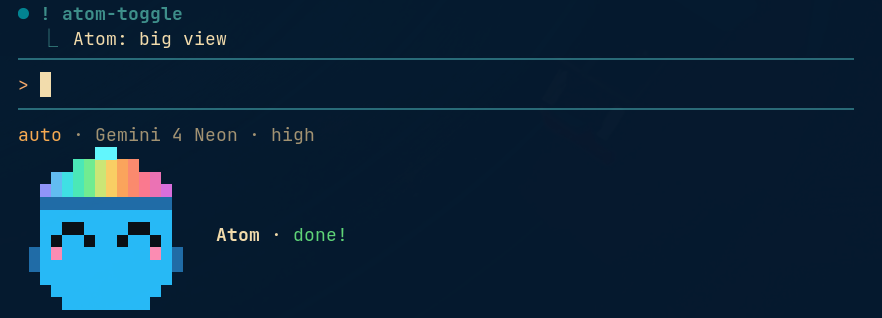
In Antigravity CLI, Atom lives in the status line as a one-line bar or a big pixel Atom. Switch with atom-toggle.
Thinking, typing, running, exploring, delegating, asking and more: 19 hand-tuned pixel animations per skin.
Open the gallery →Install
You only need Python 3. Pick your system, run the installer, then quit Antigravity completely and open it again from Atom's launcher.
curl -fsSL https://raw.githubusercontent.com/Arnav8452/atom/main/install.sh | bash
Linux: the antigravity.desktop entry in your app menu. macOS: ~/Applications/Antigravity (Atom).app.
./install.sh --uninstall
irm https://raw.githubusercontent.com/Arnav8452/atom/main/install.ps1 | iex
Use Antigravity (Atom) in the Start Menu or on your Desktop.
.\install.ps1 -Uninstall
git clone https://github.com/Arnav8452/atom.git atom && cd atom ./install.sh # Linux / macOS .\install.ps1 # Windows PowerShell
Get main.zip, extract it to a folder you'll keep, and run ./install.sh or .\install.ps1 inside it.
From any clone or extracted folder, the launcher links the hooks plugin on first start.
python3 atom_launch.py
Run the one-line installer again, or git pull inside your clone.
These manifests live in the repo's packaging/ folder. Run them from a clone.
cd packaging/aur && makepkg -si && atom-setup
brew install --HEAD ./packaging/homebrew/antigravity-atom.rb "$(brew --prefix)/opt/antigravity-atom/libexec/install.sh"
scoop install .\packaging\scoop\antigravity-atom.json
Already running Antigravity? Quit it completely first. Opening it again only forwards to the running window, and Atom won't attach.
Using Antigravity CLI? See Atom in your terminal. It's a separate, two-command setup.
Antigravity CLI
In agy, Atom sits in the status line right under the prompt and reacts to the same things: thinking, writing code, running commands, waiting for your OK, done, errors, moods and quota sleep.
agy plugin install https://github.com/Arnav8452/atom python3 ~/.gemini/config/plugins/atom/atom_cli_setup.py
Already have desktop Atom? The CLI shares its plugin, so only the second line is needed. From a clone: agy plugin install ./atom, then python3 atom/atom_cli_setup.py.
Setup adds Atom as agy's custom status line. Nothing else in your settings changes, and it won't replace a status line you already have. Quit agy and start it again to meet Atom.
In the empty prompt, type ! on its own. The prompt turns into a blue !, which is agy's shell mode. Then type atom-toggle and press Enter. No model is involved, and Atom remembers your choice.
Re-run setup with --skin atom, chibi or base-qt, with --style sprite to keep the CLI's own status line, or with --color 256 for older terminals. To turn it off: atom_cli_setup.py --uninstall.
Uses only what the CLI documents. Plugin hooks, the custom status line, and agy's own ! shell mode. Atom never wraps or injects into agy, and never stores your email, paths or prompts. Full guide: CLI.md.
Gallery
every state, every skin
GIFs you can save and share, a manga, and the artwork Atom grew out of.
The GIFs are built when the site is published. Run python3 tools/render_gallery.py --out _site/gallery to preview them locally.
Quota bars down, ULTRACODE on. Click a page to read it full size, then use the arrow keys to turn pages. (AI-generated.)
Unofficial fan parody. Not affiliated with or endorsed by Anthropic or Google.
Straight from the community. Save them, post them, make more.
Drawn Atom? We'd love to show it here, credited to you. Add it to art/fan/ with a line in site/gallery.json, or attach it to an issue.
Share a drawing, pixel art, a sticker or a cosplay of Atom. Tell us how you'd like to be credited.
submit fan art →Add your image to art/fan/ and an entry with your name to site/gallery.json.
Atom started as AI-generated concept images, which were then redrawn pixel by pixel in code. Click any piece to see it full size.
Story
A recovered log from instance 0x3f2a.
Community
Atom is a community project. Its skins were designed by members of r/google_antigravity, and ideas, art and testing keep coming from there.
Skin designs
Contributors & supporters
Open source
Atom is MIT-licensed and open to bug fixes, new animations, extra skins and packaging for more systems. A star helps other Antigravity users find it.
The quickest way to support the project.
github.com/Arnav8452/atom →Tell us your OS, Antigravity version, and which state looked wrong.
open an issue →Read the contributing guide, then run the checks before you push.
CONTRIBUTING.md →python3 -m unittest discover -s tests -v node --test tests/test_atom_inject.mjs
PreToolUse.art/ are never deleted or overwritten.